
Download Zenpai Assistant – AI Productivity Tool for Fast File Automation
Overview
Zenpai Assistant is a web‑based AI productivity platform that turns ordinary file‑handling chores into a single‑click experience. Designed for developers, freelancers, students, and anyone who spends time resizing images, converting documents, or compressing archives, Zenpai uses natural‑language prompts to understand what you need and then executes the task in the cloud. Because the application lives entirely in a browser, there is no heavy installation footprint, and updates are delivered instantly—no more patch cycles or manual downloads.
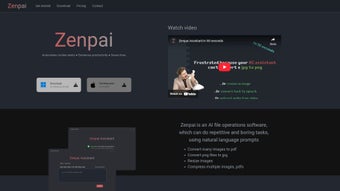
The interface follows a clean, card‑style layout that guides users from input to output with clear visual cues, making even complex batch operations feel intuitive. A generous free tier lets you process up to ten files per day, while two premium subscriptions (Starter and Pro) unlock unlimited runs, higher‑resolution processing, and priority server access. Zenpai’s roadmap is community‑driven; users can submit feature requests, and the development team incorporates feedback in regular sprint releases.
Whether you need a quick thumbnail for a social post, batch‑convert PDFs to Word, or shrink large video files for email, Zenpai Assistant promises a secure, reliable, and time‑saving solution that fits into any workflow without demanding technical expertise.
Key Features
- Natural‑Language Task Input: Simply type “Resize all images to 800 × 600” or “Convert my .docx files to PDF” and let the AI parse and act.
- Multi‑Format Support: Handles images (JPEG, PNG, GIF, WebP), documents (DOCX, PDF, TXT), archives (ZIP, RAR), and video/audio (MP4, MP3, MOV).
- Batch Processing: Upload up to 100 files at once; Zenpai processes them in parallel, delivering a single downloadable zip.
- Cloud‑Based Execution: No local CPU load—processing occurs on secure servers, freeing up your machine for other work.
- Real‑Time Preview: View a thumbnail or sample of the output before committing to the full batch.
- Customizable Workflows: Save frequently used command strings as “quick actions” for one‑click reuse.
- Secure Data Handling: All files are encrypted in transit (HTTPS) and deleted from servers within 30 minutes of completion.
- Integration Hooks: API endpoints and webhooks let you connect Zenpai with Slack, Zapier, or your own CI/CD pipeline.
- Free Tier + Scalable Pricing: Start for free, then upgrade to Starter ($9.99 / month) or Pro ($24.99 / month) for unlimited usage and priority processing.
- Responsive Design: Works equally well on desktop browsers, tablets, and mobile devices (iOS & Android browsers).
Installation & Usage Guide
Getting started with Zenpai Assistant is intentionally frictionless. Begin by visiting the official website and clicking the “Sign Up” button. Registration only requires an email address and a password; you can also opt for a Google or GitHub single‑sign‑on for faster onboarding.
Once logged in, you’ll land on the dashboard where the main command bar sits at the top. To process a file, drag and drop it onto the designated area or click “Upload Files” to browse your computer. In the command bar, type a natural‑language request—for example, “Compress all PDFs to under 2 MB” or “Resize images to 1024 × 768”.
Zenpai’s AI engine instantly parses the request, validates supported operations, and presents a confirmation dialog. Click “Run” and the cloud workers start processing. When the job finishes, a “Download All” button appears, offering a single zip file with all results.
For repetitive tasks, save the command as a “Quick Action” by clicking the star icon; it will appear in your personal toolbar for future one‑click execution. Premium users enjoy a priority queue, meaning their jobs start faster during peak times. If you encounter any issues, the built‑in “Help” widget provides live chat support and a searchable knowledge base.
Remember to regularly check the “Activity Log” for a history of processed files, which also includes timestamps and resource usage statistics—useful for audit trails or performance tuning. The entire workflow is designed to keep you in the browser, eliminating the need for local installations, system restarts, or manual updates.
Compatibility, Pros & Cons, FAQ, and Final Thoughts
Compatibility
Zenpai Assistant runs on any modern web browser that supports HTML5 and TLS 1.2 or higher. Tested browsers include Google Chrome, Mozilla Firefox, Microsoft Edge, Safari, and Opera on Windows 10/11, macOS Monterey and later, as well as Chrome / Safari on iOS and Android devices. Because the service is cloud‑hosted, there are no OS‑specific binaries to install, making it truly cross‑platform. Users on Linux distributions can also access Zenpai through any compatible browser, and the responsive UI adapts seamlessly to different screen sizes, ensuring a consistent experience whether you’re on a desktop workstation or a mobile phone.
Pros & Cons
- Pros:
- Zero‑install, web‑based – works on any device with a browser.
- Natural‑language interface reduces learning curve.
- Batch processing saves hours on repetitive tasks.
- Secure, encrypted file handling with automatic deletion.
- Free tier available for casual users.
- API and webhook support for automation workflows.
- Responsive design works on mobile and tablets.
- Cons:
- Requires an internet connection; offline usage not possible.
- Processing speed depends on server load and subscription level.
- Advanced image editing (e.g., layer manipulation) not supported.
- Free tier limits daily file count, which may be restrictive for power users.
Frequently Asked Questions
Is Zenpai Assistant safe for confidential documents?
Yes. All file transfers are encrypted with HTTPS, and files are stored on Zenpai’s servers for a maximum of 30 minutes after processing before being permanently deleted. The platform complies with GDPR and CCPA standards, ensuring personal data is handled responsibly.
Can I integrate Zenpai with my existing automation tools?
Absolutely. Zenpai offers RESTful API endpoints and webhook triggers that let you connect the service to Zapier, Integromat, Slack, or custom scripts. This makes it easy to embed file conversion steps directly into CI/CD pipelines or content‑management workflows.
What browsers are officially supported?
Zenpai runs on the latest versions of Chrome, Firefox, Edge, and Safari. Mobile browsers on iOS and Android are also fully supported, provided they support HTML5 and TLS 1.2 or newer.
How does the pricing structure work?
There is a free tier that allows up to ten files per day. The Starter plan costs $9.99 / month and offers unlimited files, higher priority processing, and access to premium formats. The Pro plan at $24.99 / month adds API access, custom workflow templates, and dedicated support.
What happens if my file upload fails?
If an upload is interrupted, Zenpai automatically retries up to three times. Should the issue persist, an error message appears with a diagnostic code, and the support chat widget becomes available for immediate assistance.
Conclusion & Call to Action
Zenpai Assistant delivers a compelling blend of AI‑driven simplicity and powerful batch processing, all wrapped in a secure, browser‑first experience. For anyone who regularly resizes images, converts documents, or compresses files, the tool eliminates the need for multiple desktop utilities and reduces the time spent on repetitive chores. The free tier provides enough capability for occasional users, while the affordable premium plans scale gracefully for professionals and teams. If you’re ready to boost productivity, reduce manual effort, and keep your workflow cloud‑native, click the button below to create a free account and start automating today.
Start Your Free TrialPros: Zero‑install, natural language, batch processing, strong security, free tier.
Cons: Requires internet, limited offline, free tier caps daily usage.






